Why Your Smart SIM Was Deactivated After Registration? Causes and Fixes
If your Smart SIM was successfully registered but later stopped working, you may be wondering why it was deactivated after registration. A registration confirmation does not always mean that a SIM will remain active forever. Smart can also deactivate a SIM for other reasons, including inactivity, account status issues, registration problems, or network-related conditions.
The good news is that not every deactivated Smart SIM has the same cause. Before buying a replacement SIM, first check your registration status, account activity, and the type of deactivation affecting your number.
Why Was My Smart SIM Deactivated After Registration?
SIM registration is required before a Smart SIM can be used under the applicable SIM Registration rules, but registration and ongoing account activity are separate matters. If your SIM was registered and later became inactive, you should determine whether the problem is related to registration, activation, inactivity, or another account issue.
For example, Smart says that SIMs that remain in a pre-active status and are not properly used may be deactivated during regular system cleanups. Smart also provides separate guidance for checking whether a SIM is registered.
1. The SIM Was Not Fully Activated
A newly purchased SIM may still need to be activated and registered correctly before all services become available. If the activation process was not completed, the SIM may not work as expected.
2. The SIM Remained Unused
Smart’s current guidance says that prepaid SIMs that remain in a pre-active status and are not properly used may be deactivated during system cleanups.
3. Registration Information Needs Attention
A registration can fail or require additional verification when the submitted information does not meet the applicable requirements.
4. The Account Reached a Disconnection Condition
Prepaid accounts have validity rules. Smart currently states that when the balance reaches zero, customers have a limited period to reload before the prepaid account is disconnected.
1. Your Smart SIM May Not Have Been Fully Activated
One common source of confusion is the difference between purchasing a SIM, registering it, and actually having an active service. A new Smart SIM must complete the required registration and activation process before normal mobile services are available.
If your SIM was recently purchased, check whether you received the expected registration confirmation and whether calls, SMS, and mobile data work after activation.
Smart’s official information states that once a Smart prepaid eSIM is registered, mobile services such as incoming and outgoing voice, SMS, and data can be activated.
2. Your SIM May Have Been Left Unused
If you purchased a Smart prepaid SIM but left it unused for a long time, inactivity can be an important reason to investigate.
Smart’s recent customer guidance says that SIMs remaining in a pre-active status without proper use may be deactivated and removed from Smart’s network records during regular system cleanups.
For active prepaid customers, Smart also advises regular reloads and normal use such as calls, texts, or mobile data activity to help keep the number active.
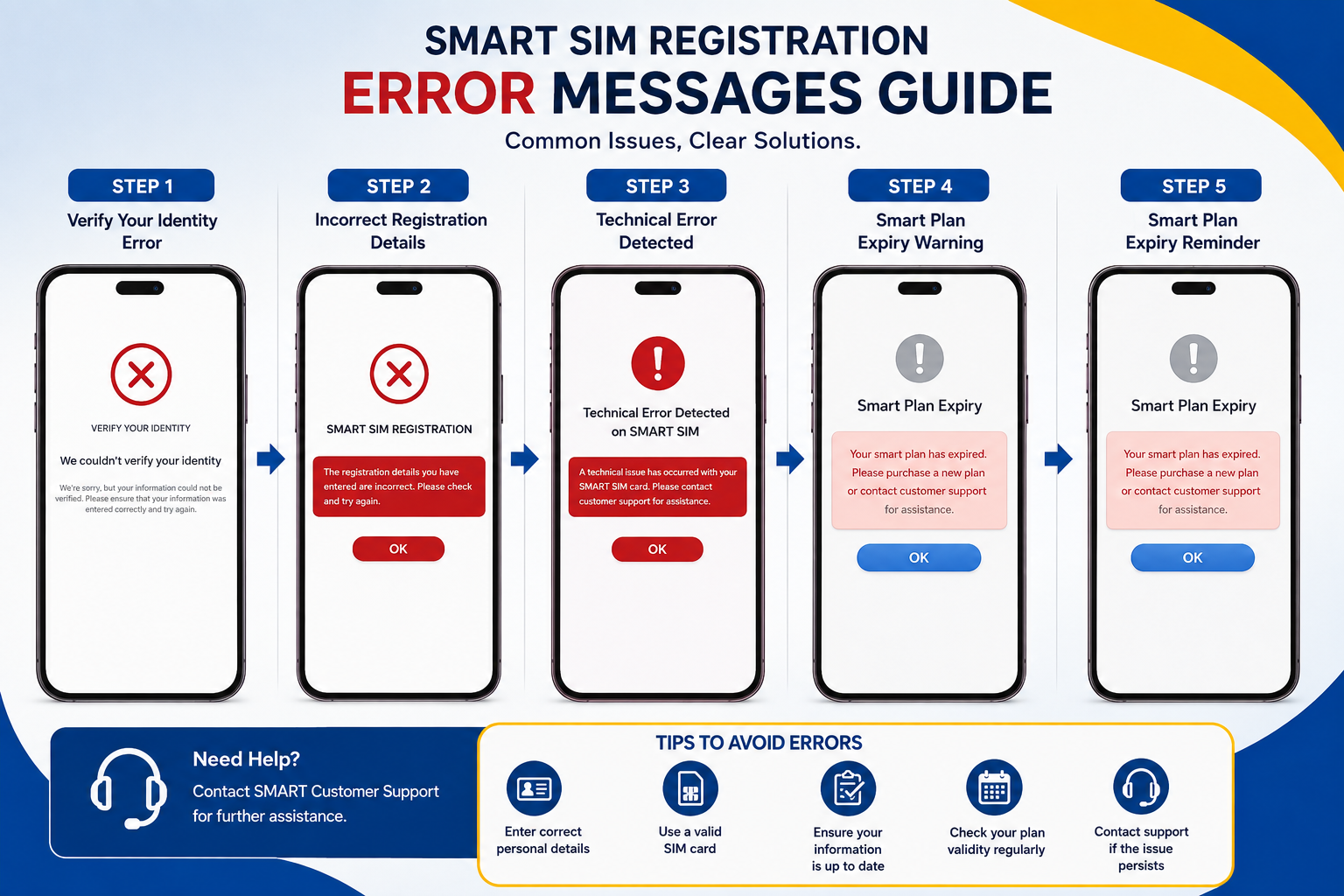
3. Incorrect Registration Details Can Cause Problems
When registering a SIM, the information submitted must be accurate and must satisfy the requirements of the registration process. Incorrect personal information, an unsuitable ID, or a problem with the submitted details can cause registration issues.
Smart’s registration guidance explains that subscribers provide personal information and a valid identification document during registration. For some users, additional requirements can apply depending on their subscriber type.
If you are unsure whether your registration was completed successfully, do not assume that a previous registration attempt was accepted. Check the status through Smart’s available registration channels.
4. Your Smart Prepaid Account May Have Expired
Another situation is an inactive prepaid account rather than a registration failure. Smart currently explains that when a prepaid account balance reaches zero, the customer has a period in which they can reload to keep the account active. Failure to reload within that period can lead to disconnection.
This means a SIM can be properly registered but still become disconnected later because of account validity rules.
| Situation | What You Should Check |
|---|---|
| Recently bought SIM | Activation and registration confirmation |
| Registered but never used | SIM activity and pre-active status |
| No load for a long period | Prepaid account validity |
| Registration rejected | Personal details and valid ID |
| No signal after working normally | Device, SIM, network, and account status |
How to Check if Your Smart SIM Is Registered
Before trying to register the same number again, check whether Smart already recognizes your SIM as registered.
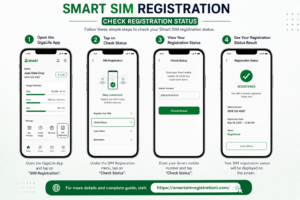
Smart provides more than one way to check registration status. Its official help information says Smart Prepaid, Smart Bro Prepaid, and Smart Bro Home WiFi users can check through the GigaLife App or the Smart SIM Registration Portal.
-
Open the GigaLife App.
Log in and look beside your mobile number for the registration status or badge. -
Check through the Smart SIM Registration Portal.
Use the official Smart registration service and follow the available prompts. -
Look for the registration confirmation.
If the system confirms that the SIM is registered, avoid submitting unnecessary duplicate registration details. -
Contact Smart if the status is unclear.
If your SIM is shown as registered but remains inactive, the issue may be related to activation, account validity, or another service problem.
What to Do If Your Smart SIM Is Deactivated
The correct solution depends on why the SIM was deactivated. Start by identifying the problem rather than immediately purchasing another SIM.
Step 1: Check Your Registration Status
Confirm that your number is still recognized as registered. This helps separate a registration problem from an account or network problem.
Step 2: Restart Your Phone
Turn the phone off completely, wait a few seconds, and turn it back on. If possible, also remove and reinsert the physical SIM.
Step 3: Check for Signal
Try another location if your phone shows no signal. Smart’s troubleshooting guidance also recommends checking whether the issue occurs indoors or outdoors and testing the SIM in another compatible device when necessary.
Step 4: Check Your Account Activity
If you have a prepaid SIM, consider whether the number has been unused for an extended period or whether your account has reached its validity limit.
Step 5: Contact Smart Support
If the SIM shows as registered but still cannot connect to the network, Smart support can determine whether the number is active, disconnected, or requires another solution.
Can a Deactivated Smart SIM Be Reactivated?
Reactivation depends on the reason and type of deactivation. Smart’s registration documents have specific provisions for certain registration-related automatic deactivations, while prepaid account disconnection and SIM purging can have different rules.
For this reason, there is no single reactivation method that works for every deactivated Smart SIM.
Smart SIM Deactivated Because It Was Not Used
If the SIM was purchased recently but was never properly used, the situation can be different from an old prepaid number that has already reached its account validity limit.
Smart’s current guidance specifically warns that SIMs remaining in a pre-active state may be deactivated during system cleanups. The company recommends regular reloads and normal usage to help keep a prepaid number active.
If you have an important phone number connected to banking, social media, email, or e-wallet accounts, it is especially important to keep the number active and accessible.
Smart SIM Registered but No Signal
Registration is only one part of the troubleshooting process. A registered SIM can still show no signal because of device settings, local coverage, SIM damage, or an account-related issue.
- Restart the phone.
- Check whether Airplane Mode is turned off.
- Try moving to an area with better reception.
- Remove and reinsert the SIM.
- Test the SIM in another compatible phone if available.
- Check whether the account is active.
- Contact Smart if the problem continues.
Smart SIM Deactivated After Registration: Registration vs Activation
It helps to understand that registration and activation are not exactly the same thing. Registration associates the SIM with the required subscriber information. Activation allows the mobile service to operate according to Smart’s applicable process.
If your phone says the SIM is registered but you cannot make calls, send texts, or use mobile data, investigate the service status instead of repeatedly submitting the same registration information.
What Happens When a Smart SIM Is Disconnected?
A disconnected or deactivated SIM may stop providing normal mobile services. Depending on the reason, you may lose access to calls, texts, data, and services that rely on your mobile number for OTP verification.
Smart has previously explained that a deactivated SIM can affect incoming and outgoing calls, SMS, internet access, and remaining prepaid load. This is why keeping an important number active is especially important.
Smart SIM Registration Guides
If you are still having trouble with your Smart SIM, these related guides can help you check the registration process and other Philippine SIM registration options.
Smart SIM Registration
Learn about the main registration process and the information you may need before submitting your Smart SIM registration.
Visit Smart SIM Registration GuideSmart SIM Registration Methods
Compare the available ways to register your Smart SIM and understand the basic steps before you begin.
See Registration MethodsTNT SIM Registration
If you use TNT instead of Smart, see the dedicated registration guide for TNT users.
Open TNT SIM Registration GuideGlobe SIM Card
Looking for information about another Philippine network? Our Globe SIM guide covers the related registration topic.
Open Globe SIM Card GuideDITO SIM Registration
DITO subscribers can use our separate guide for information about registering a DITO SIM.
Open DITO SIM Registration GuideTM SIM Registration
TM users can find registration information and related instructions in our dedicated TM SIM guide.
Open TM SIM Registration GuideHow to Avoid Smart SIM Deactivation
Once your SIM is working again, take a few simple steps to reduce the chance of future problems.
- Keep your registration information accurate.
- Use the SIM regularly if it is a prepaid number.
- Reload the account according to the applicable validity rules.
- Keep the Smart app available so you can monitor your account.
- Pay attention to Smart messages and service advisories.
- Do not ignore notifications about account status or registration.
- Keep your important accounts updated if you replace your mobile number.
Smart SIM Deactivated After Registration: Common Mistakes
Using an Unofficial Registration Website
Always check that you are using the legitimate Smart registration service before submitting your ID, selfie, mobile number, or other personal information.
Registering Multiple Times
If your registration was already confirmed, repeated submissions may create confusion. Check the current status first.
Ignoring Account Validity
Registration does not remove the normal need to maintain an active prepaid account.
Throwing Away the Transaction Details
Keep your registration confirmation and other relevant transaction information in case you need support later.
Frequently Asked Questions
Possible reasons include incomplete activation, inactivity or pre-active status, account validity issues, registration problems, or another service-related condition. Check your registration and account status first.
Yes. Registration does not guarantee that a prepaid account will remain active forever. Smart has separate rules covering SIM activity and prepaid account validity.
Smart says eligible users can check through the GigaLife App or the Smart SIM Registration Portal.
Restart the phone, check the SIM and network signal, test the SIM in another compatible device if possible, and contact Smart support if the problem continues.
It depends on the reason for deactivation. Some registration-related deactivations have specific reactivation rules, while permanently disconnected or purged numbers may not be recoverable.
Not every deactivation has the same outcome. Temporary restrictions and permanent disconnection are different situations. Contact Smart to determine the current status of your number.
Check whether the SIM was properly activated and registered, then restart the phone and test the SIM in another compatible device if possible.
First check the current registration status. If Smart already recognizes the number as registered, contact Smart support instead of repeatedly submitting the same information.
Official Smart Resources
For the latest registration and account information, use Smart’s official resources. Information and procedures can change, so verify important account issues directly with Smart.
Conclusion
If your Smart SIM was deactivated after registration, do not assume that the registration itself failed. The cause can be related to activation, inactivity, pre-active status, prepaid account validity, registration details, or another account condition.
Start by checking whether Smart still recognizes your SIM as registered. Then check your account activity, restart your phone, test the SIM and network, and contact Smart support if the number remains inactive.
Most importantly, use official Smart channels when checking your registration or submitting personal information. Avoid unofficial websites that ask for sensitive information or promise to reactivate a number without verifying the account.