
TM SIM Registration Link 2026 – Register Your TM SIM Online Easily
Register your TM SIM card online in just a few minutes by following our complete step-by-step guide. Whether you are activating a new TM SIM or registering an existing prepaid SIM, this guide explains the entire process, including the required documents, accepted IDs, OTP verification, common registration errors, and how to check your registration status.
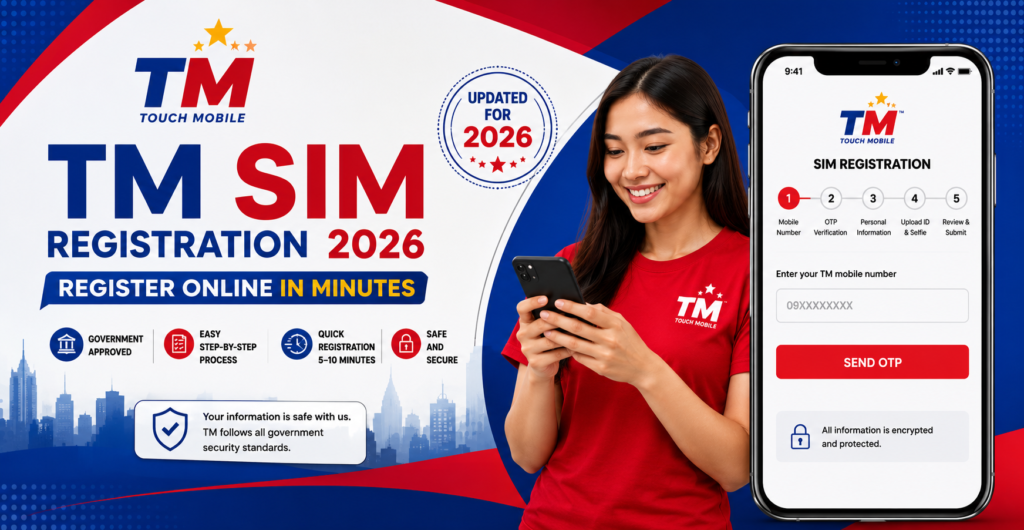
TM SIM Registration is a mandatory process required under the Philippines’ SIM Registration Act. Every TM prepaid and postpaid user must register their SIM card using valid personal information before it can be used without restrictions. Completing the registration helps protect users from fraud, spam messages, identity theft, and other mobile-related scams.
Who Needs to Register?
The following users should complete TM SIM Registration:
- New TM prepaid SIM users
- Existing TM SIM users who have not yet registered
- TM postpaid subscribers
- Filipino citizens and permanent residents
- Foreign nationals living in the Philippines
- Tourists using a TM SIM during their stay
- Minors (with a parent or guardian assisting where required)
TM SIM Registration Requirements
Learn about all the documents and information you need before starting your TM SIM registration. Preparing these requirements in advance will help you complete the registration process quickly without delays.
Accepted Valid IDs for TM SIM Registration
Find the complete list of government-issued IDs accepted during TM SIM registration. Make sure your ID is valid, clear, and not expired to avoid verification issues.
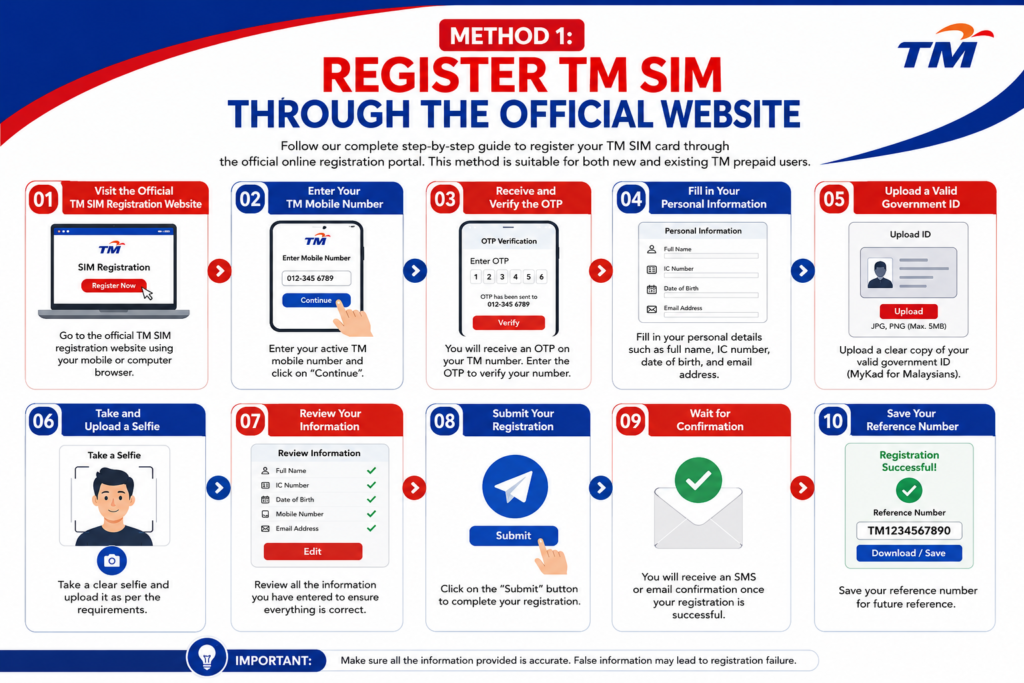
Method 1: Register TM SIM Through the Official Website
Follow our complete step-by-step guide to register your TM SIM card through the official online registration portal. This method is suitable for both new and existing TM prepaid users.
Steps Included:
- Step 1: Visit the Official TM SIM Registration Website
- Step 2: Enter Your TM Mobile Number
- Step 3: Receive and Verify the OTP
- Step 4: Fill in Your Personal Information
- Step 5: Upload a Valid Government ID
- Step 6: Take and Upload a Selfie
- Step 7: Review Your Information
- Step 8: Submit Your Registration
- Step 9: Wait for Confirmation
- Step 10: Save Your Reference Number
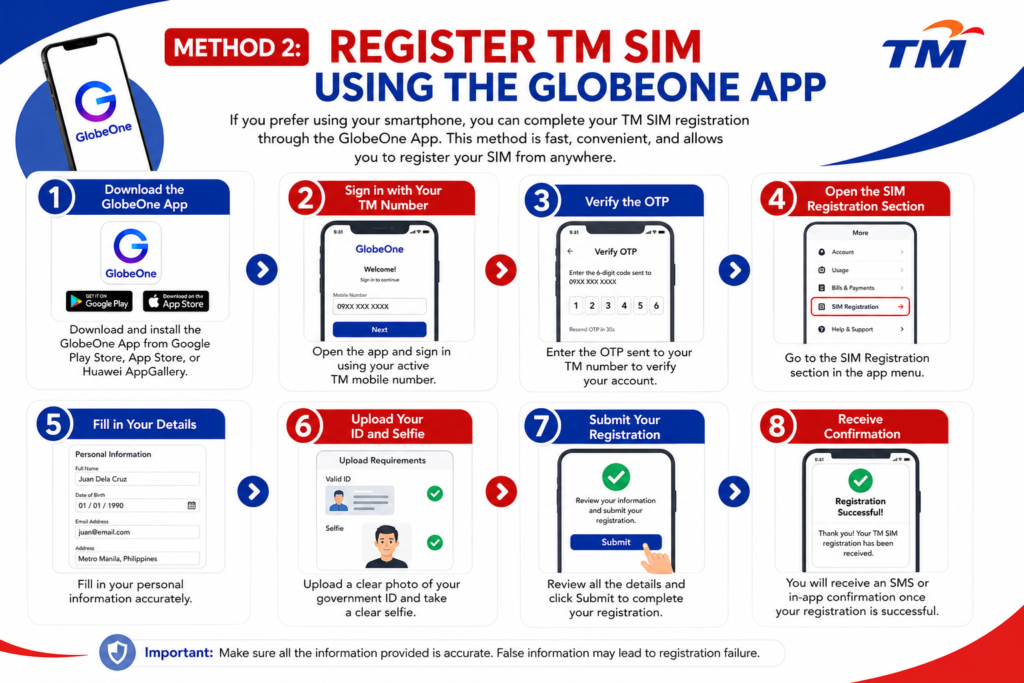
Method 2: Register TM SIM Using the GlobeOne App
If you prefer using your smartphone, you can complete your TM SIM registration through the GlobeOne App. This method is fast, convenient, and allows you to register your SIM from anywhere.
Steps Included:
- Download the GlobeOne App
- Sign in with Your TM Number
- Verify the OTP
- Open the SIM Registration Section
- Fill in Your Details
- Upload Your ID and Selfie
- Submit Your Registration
- Receive Confirmation
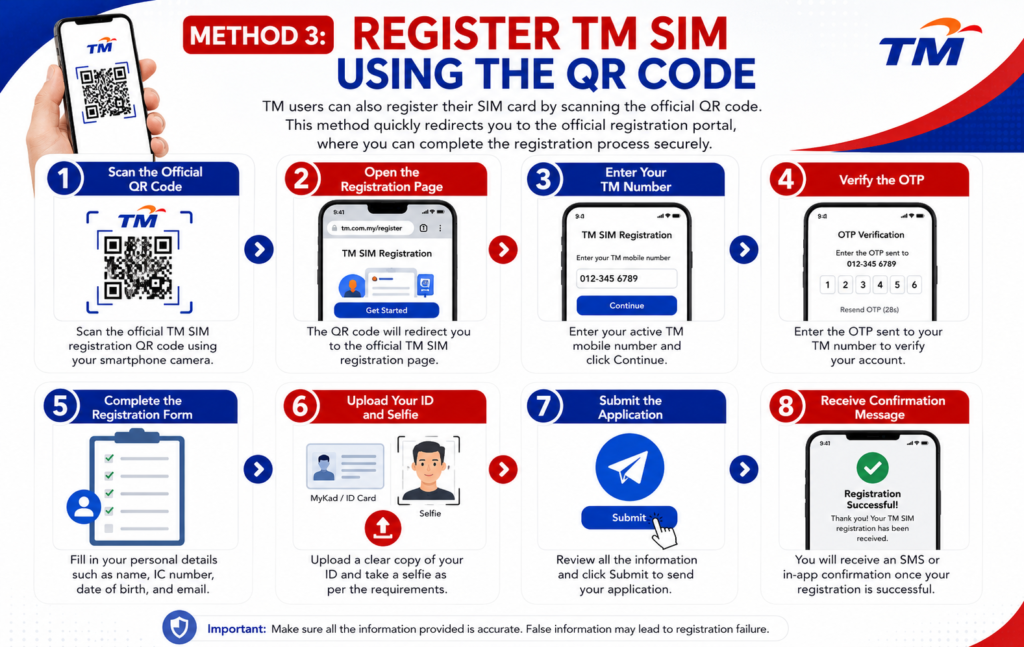
Method 3: Register TM SIM Using the QR Code
TM users can also register their SIM card by scanning the official QR code. This method quickly redirects you to the official registration portal, where you can complete the registration process securely.
Steps Included:
- Scan the Official QR Code
- Open the Registration Page
- Enter Your TM Number
- Verify the OTP
- Complete the Registration Form
- Upload Your ID and Selfie
- Submit the Application
- Receive Confirmation Message
How to Check Your TM SIM Registration Status
If you’re unsure whether your TM SIM card has already been registered, you can easily check its registration status online. This helps confirm that your SIM is active and successfully linked to your personal information.
Follow These Steps:
- Visit the official TM SIM Registration portal.
- Enter your TM mobile number.
- Request the One-Time Password (OTP).
- Enter the OTP received on your phone.
- Your registration status will appear on the screen.
- If your SIM is registered, you’ll see a confirmation message.
- If it’s not registered, complete the registration process immediately.
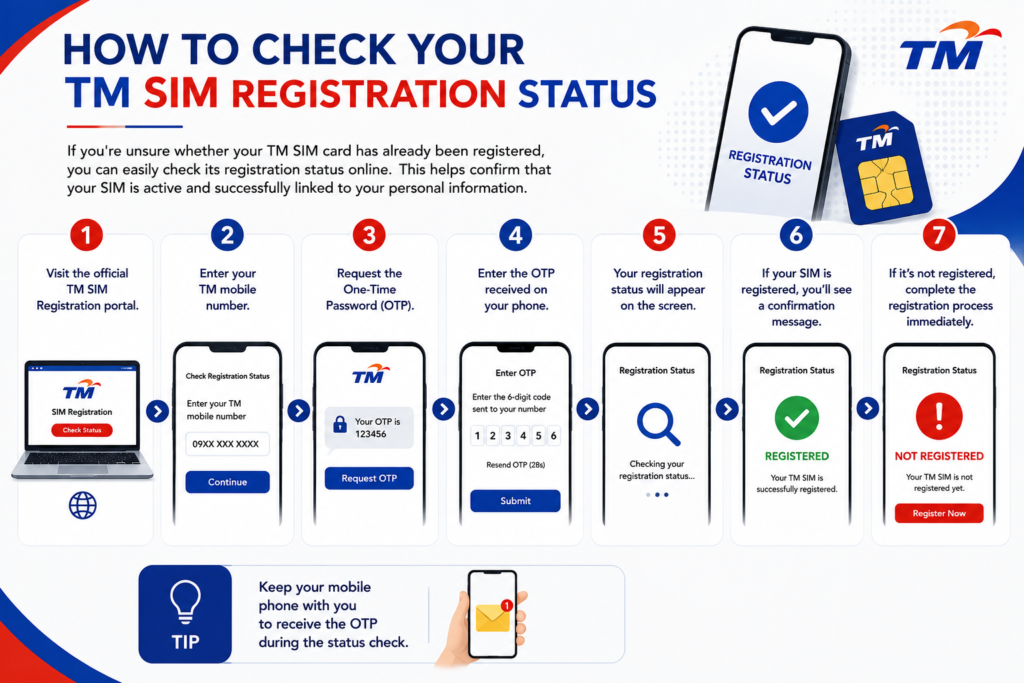
Tip: Keep your mobile phone with you to receive the OTP during the status check.
TM SIM Registration OTP Problems & Solutions
Sometimes users may not receive the OTP or experience verification issues. Below are the most common problems and their solutions.
| Problem | Solution |
|---|---|
| OTP not received | Wait 2–5 minutes and tap Resend OTP. |
| Invalid OTP | Make sure you enter the latest OTP sent to your phone. |
| OTP expired | Request a new OTP and enter it within the time limit. |
| Weak network signal | Move to an area with better network coverage. |
| SMS inbox full | Delete old messages and try again. |
Tips
- Use a strong mobile signal.
- Do not request multiple OTPs at once.
- Always enter the newest OTP received.
Common TM SIM Registration Errors
If your registration fails, don’t worry. Most issues can be fixed easily.
Common Errors
Invalid Mobile Number
Check that you’ve entered the correct TM mobile number.
Blurry ID Photo
Upload a clear, readable image of your government-issued ID.
Selfie Verification Failed
Take a selfie in good lighting without sunglasses, masks, or filters.
Website Not Loading
Refresh the page or try another browser.
Already Registered SIM
If your SIM is already registered, use the Registration Status page to verify it instead of submitting another application.
TM SIM Registration for Foreigners
Foreign nationals staying in the Philippines can also register their TM SIM cards by providing the required documents.
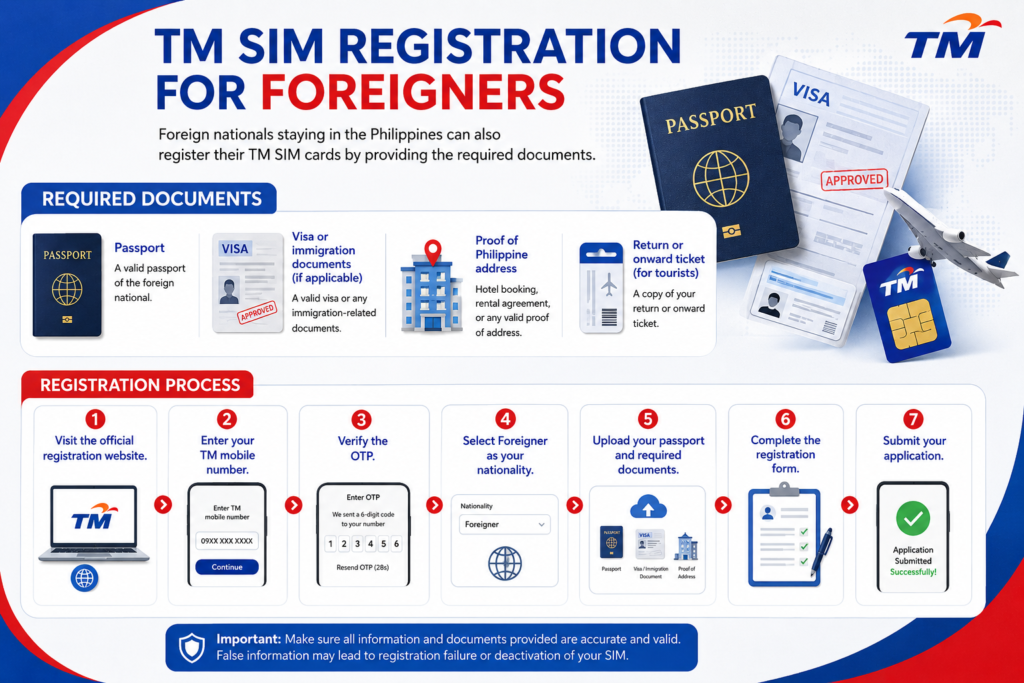
Required Documents
- Passport
- Visa or immigration documents (if applicable)
- Proof of Philippine address (hotel booking, rental agreement, etc.)
- Return or onward ticket (for tourists)
Registration Process
- Visit the official registration website.
- Enter your TM mobile number.
- Verify the OTP.
- Select Foreigner as your nationality.
- Upload your passport and required documents.
- Complete the registration form.
- Submit your application.
Frequently Asked Questions (FAQs)
1. Is TM SIM Registration free?
Yes. TM SIM registration is completely free.
2. Can I register my TM SIM online?
Yes. You can register through the official registration website.
3. Do I need a valid ID?
Yes. A government-issued ID is required.
5. Can foreigners register a TM SIM?
Yes. Foreign nationals and tourists can register by submitting the required documents.
7. Can I register more than one TM SIM?
Yes, provided each SIM is registered using the required information.
8. What should I do if I don’t receive the OTP?
Wait a few minutes, check your signal, and request a new OTP.
How can I contact TM Customer Service?
You can contact TM Customer Service by dialing 808 from your TM mobile number. If you’re using another network or a landline, call (02) 7730-1500. You can also visit the nearest TM or Globe Store for in-person assistance with SIM registration, account concerns, and other mobile services.
Is TM Customer Service available 24/7?
TM customer support is available to assist users with SIM registration, network issues, promos, and account-related concerns. Response times may vary depending on call volume and the support channel you use. Keep your TM mobile number and personal details ready before contacting customer service for faster assistance.
How can I Pasaload from TM to another TM number?
You can transfer load from one TM number to another using the *143# menu, SMS, or the GlobeOne App. Simply choose your preferred method, enter the recipient’s TM number, select the load amount, and confirm the transaction. Once completed, both users will receive a confirmation message.
Can I use the GlobeOne App to Pasaload TM load?
Yes. Open the GlobeOne App, sign in with your TM number, select the Send Load or Share Load option, enter the recipient’s TM number, choose the amount, and confirm the transaction. After the transfer is successful, both the sender and recipient will receive a confirmation notification.
Conclusion
TM SIM Registration is a simple but important process that helps protect users from fraud, spam, and identity theft while ensuring compliance with the Philippines’ SIM Registration Act. Whether you are registering a new TM SIM or an existing one, completing the process only takes a few minutes when you have your valid ID and personal information ready.
This guide has covered everything you need—from registration requirements and accepted IDs to step-by-step registration methods, OTP troubleshooting, registration status checks, and instructions for foreign nationals. Follow each step carefully, submit accurate information, and keep your reference number for future use.
If you’re ready, visit the official TM SIM registration portal and complete your registration today to continue enjoying uninterrupted TM mobile services.